
How to release your app
Dolphin Depot is working toward a shared distribution model for GameCube homebrew, similar to what the Wii scene established with their Homebrew Channel conventions. Following the same layout across apps means users get a consistent experience across launchers.
On-device layout
Applications are distributed as DOL files (the GameCube executable format). Once installed on a user's storage device (SD Gecko, SD2SP2, MMCE, GCLoader etc.), each app lives in its own directory under /apps/:
apps/
└── {slug}/
    ├── default.dol
    └── opening.bnr
{slug} is a simplified version of your application's name used as the directory identifier. It
must be lowercase, contain no special characters, and the only non-alphanumeric characters
allowed are - and _.
File default.dol Required
It is the primary executable for the application. Launchers look for this file by name, so every app must ship one.
If your project has multiple build variants (for example, a debug build or a cut-down version for specific hardware), you can include additional .dol files in the same directory. Only one of them should be named default.dol: the one most users should run by default. The others can live alongside it under descriptive names.
Sticking to the /apps/{slug}/default.dol layout lets the Dolphin Depot client recognize your
app on the user's storage device and notify them when a new version is available for download,
all without any extra configuration on your side.
File opening.bnr Recommended
We strongly encourage shipping an opening.bnr file next to your executable. This is the same banner format Nintendo used on retail GameCube discs, and it contains:
- Name: the display title of the application
- Developer: the author or team
- Short and long description
- Banner image: a 96×32 pixel image shown next to the app entry
Launchers such as Swiss, Cubeboot, and Cubiboot read opening.bnr to render a rich entry for your app (with the banner artwork and readable metadata) instead of just showing a filename. Without it, your app will still launch, but it will look plain in the menu and blend in with unlabeled homebrew.
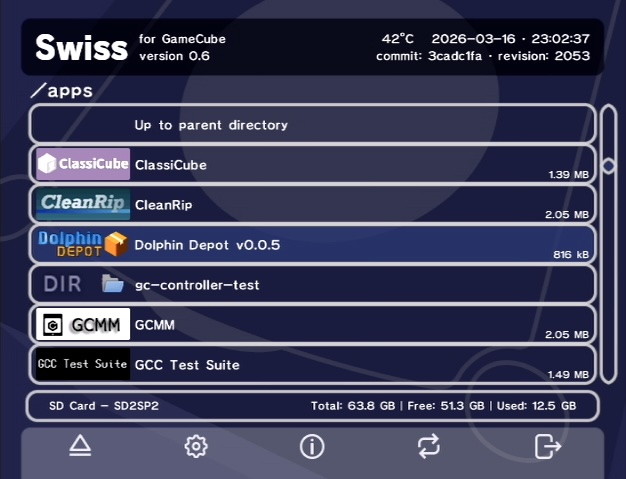
Apps with opening.bnr show their banner, while entries without one fall back to a plain
filename.
Generating opening.bnr
Hand-crafting the binary format is tedious, so we've built an online tool that takes a PNG banner and metadata and produces a valid opening.bnr for you.
Open Banner generator